How we scaled our frontend across hundreds of endpoints

As RESTful APIs grow in size, with multiple versions and hundreds of endpoints, they explode in complexity. Precise caching with a strong dev experience is one such way to tame the complexity. This is how we've approached that problem at Sequence, returning to a more restful place.
Imagine the scene: you have a clear calendar, it’s raining outside, and things are getting done. The flow is flowing. Then, the dreaded Slack message:
“I’ve just added a new contact, but it isn’t appearing in the contacts dropdown on the Invoices screen. Is this a frontend bug?”
The flow stops. The rain miraculously turns into the most perfect summer day[1]. You sigh. API response caching has ruined your plans once again.
It’s difficult to avoid using it, of course. The frontend app needs to render the same bit of data all over the shop, and you don’t want your user to actively wait for that API call every single time. What if they’re on a train with bad latency? Opening a simple select could take them seconds every time.
But with great caching comes great responsibility. No-one wants to be on the receiving end of a saddeningly sticky stale cache.
How do you do that at any kind of reasonable scale though? How do you manage the tangle of relationships when there are dozens, nay, hundreds of endpoints? Well, I’m here to spin a yarn on how we’ve tried (and, so far, succeeded) in doing so.
Tanstack query, best query
It all starts, as many web apps do[2], with Tanstack Query. When Tanstack Query (formerly known as React Query) arrived, it heralded a huge shift in how we worked with APIs.
In the Tanstack Query model, the result of each query made through the library is associated with a key in a shared cache. There can be any number of subscribers (using useQuery) watching out for changes to that cached data. Therefore, whenever you grab new data, these subscribers receive the new data, and trigger re-renders where you need them.
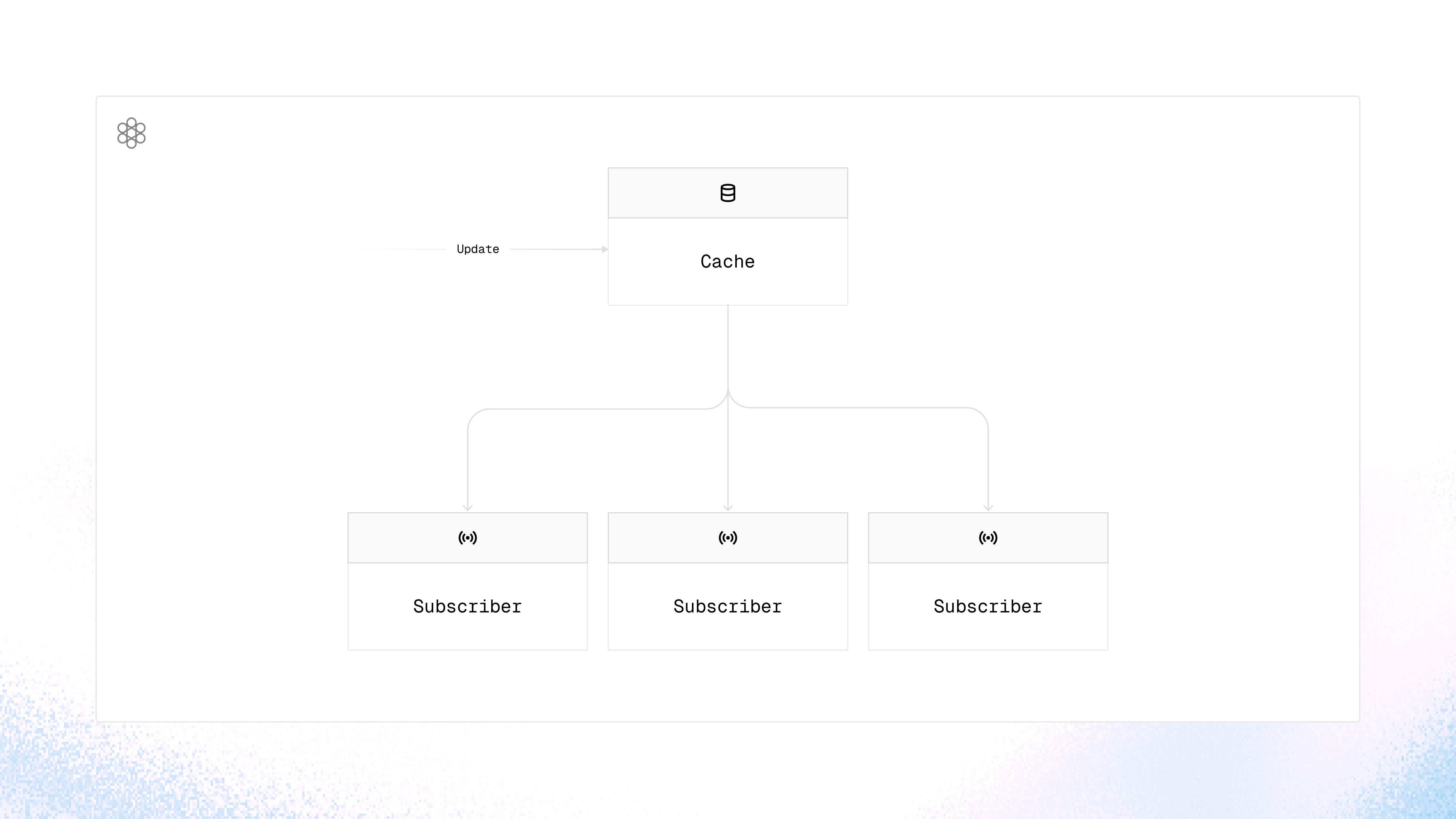
You can also ‘invalidate’ that cache key. This makes the data ‘stale’, meaning any actively mounted subscribers will refetch that data. If you do happen to have multiple active subscribers, Tanstack Query dedupes the API calls so your invalidations avoid an avalanche of requests hitting your services because someone had the utter temerity to save something.
This was, and is, pretty amazing. You could always try to do this yourself with shared context (either via React or state management like Redux), but it was much more manual, complex, and error-prone. This, by comparison, is a huge improvement in reasonably attainable DevExp.
It wasn’t the very first library to use this pattern - Apollo and Relay worked similarly for GraphQL - but React Query really brought the pattern to the REST masses who didn’t have the time / couldn’t convince enough of their team to build a GraphQL API or some other very fancy solution™️.
Scaling up!
So, Tanstack Query. Great library, very useful. However, like nearly any tool, you still need to learn how to wield it if you’re to avoid chaos[3].
The most likely thing to ruin your day is how caching is set up. When there’s only a couple of types of data to manage in the cache, it’s simple enough to manage. Chuck a unique string at it, and you’re sorted!
However, scale this to a large application with dozens, if not hundreds, of different cache items, and a smidge more finessing is required.
There’s a couple of major things to watch out for:
1) Different data shapes ending up in the same cache item
For example, the contacts on a customer are modelled differently in API version 2 vs. 1. If this happens, a useQuery subscriber may get something unexpected, and the wonky data can cause a crash.
2) Inconsistent invalidation
When this happens, stale data will hang around, causing myriad bugs of all severities. This is particularly problematic if you have multiple API versions to deal with, with different cache items because of their differing shapes.
Annoying but solvable! Here’s our solution:
The (cache) keys to the kingdom
All of our API interactions are done via an API package. This abstraction allows us to pack in all kinds of metadata and goodies into each of our API calls. Beyond that, we also provide enhancements over the baseline Tanstack Query.
When we define a query endpoint (an API call that fetches data), we also define the query keys used to cache its response:
export const getCustomer = createQueryEndpoint<
  { id: string },
  GetCustomerResponse
>({
  route: ({ id }) => `/customers/${id}`,
  // A small aside here is that we keep our cache keys in constants files that
  // are imported, so that everything stays aligned.
  queryKey: [CUSTOMERS],
  ...otherStuff
})
These endpoints, and their associated configurations, are then rolled up into clients . Each client targets a specific API version and can be initialised with further ‘root’ query keys.
dashboardv20240730Client.initialize({
  ...otherStuff,
  baseQueryKey: organizationId
})
This gives us a set of functions that fetch data for that API version and add data into the cache as it goes.
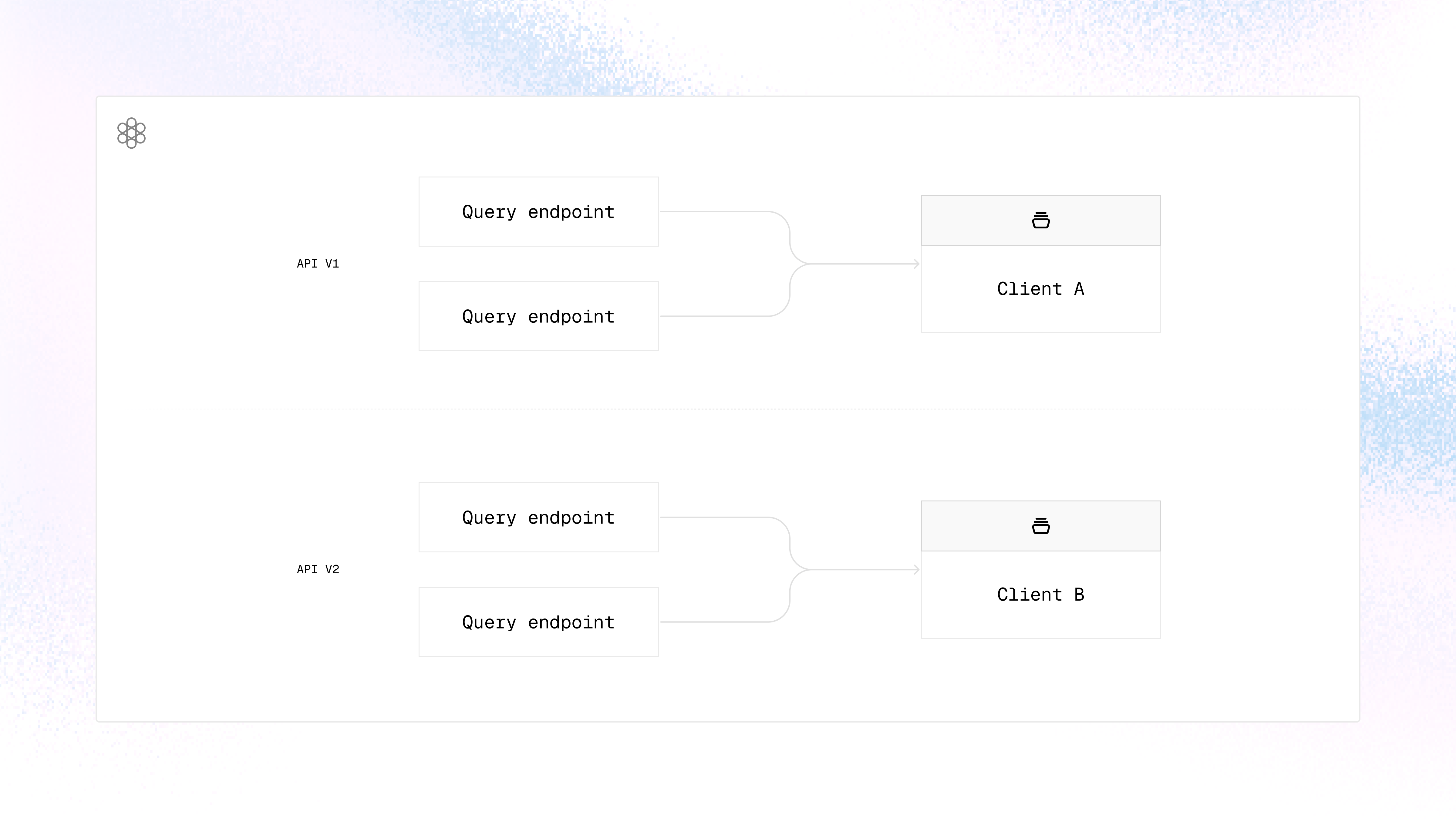
These clients, and their associated functions, can either be called directly (which ignores cache for the call itself, but populates the cache with the result), or used with our light abstractions over the Tanstack hooks:
dashboard20240730.getCustomer({ id: "foo" })

const customerQuery = useQuery(dashboard20240730Client.getCustomer, {
  id: customerId,
  // We can provide the usual tanstack query options here, too, aside from
  // queryKey, of course!
  enabled: Boolean(invoiceQuery.data?.customerId),
  staleTime: 60000
})
These light abstractions avoid the manual plumbing needed if using useQuery directly for aspects like queryFn or the query keys. It’s especially useful for mutations and invalidation, which is somewhat ‘manual’ with vanilla Tanstack.
The cache keys we produce using these functions are contextual based on the params passed in, and all of that client configuration we noted above. A call to the customer above would end up with a real cache key resembling:
['the-organisation-id', '2024-07-30', 'customers', '{ id: "the-id" }']Which keeps it unique, with no effort required from the implementing developer! Particularly nice when said developer is, say, Claude.
This means we can:
- Freely add API versions and benefit from caching without any cross-version conflict concerns, as long as we correctly configure the keys within the same API version.
- Avoid cross-contaminating different instances of the same entity, by default.
- Avoid leaking cached data between organisations, which could cause all kinds of horrible cache bugs for users with multiple accounts.
Getting the data into a cache is only part of the puzzle, though! We also need to invalidate it accurately…
Begone, cache item
Usually, staleness is pretty undesirable. Who wants a stale cake? The sacrificial first biscuit in a slightly open packet, who took one for the team and has lost the necessary crunch for peak biscuit-y goodness? No thank you. But staleness in the context of Tanstack? Yes please!
As we noted earlier, a stale cache item informs all subscribers that the data needs reloading. It’s a key mechanism for making sure app updates are reflected uniformly. Therefore, making sure invalidation works correctly is paramount.
Our ‘mutation endpoints’ (they mutate / change stuff!), in a mirror of our query endpoints, must define the keys that are invalidated whenever we run the mutation:
export const postCustomer = createMutationEndpoint<
  { body: CustomerBody },
  CreateCustomerResponse
>({
  route: () => `/customers`,
  method: 'POST',
  ...gubbins,
  invalidateQueries: [CUSTOMERS]
})
This is utilised by our generated client functions and wrapped Tanstack Query hooks to correctly invalidate the cache and set those items to a stale state.
The default approach for Tanstack Query is to perform a left-most match. If you provide a key of ['customers'] it will invalidate ['customers', 'foo'] but not ['foo', 'customers'] . This is a fine default, but not great for us with our different organisations and API versions to deal with. Instead, our approach to invalidating is to invalidate any cache key which contains the entire invalidation cache key anywhere within it.
This means that in the above case, any cache key containing the CUSTOMERS cache key is invalidated. It doesn’t matter which API version, base query key, or what follows the key. It’s all invalidated.
// Both are invalidated when we invalidate 'customers'
['the-organisation-id', '2024-05-09', 'customers', '{ id: "the-id" }']
['the-organisation-id', '2024-07-30', 'customers', '{ id: "another-id" }']
We can go more specific e.g. ['customers', '{ id: "the-id" }'] if we truly wanted to, but in practice we have yet to make use of that level of specificity.
This simplification means we trivialise cross-version invalidation, reducing the pressure to immediately update every caller of a new API version. It also grants us the option to configure query keys so that invalidating a ‘parent’ entity can invalidate children:
// Invalidating CUSTOMERS would also invalidate this query key!

export const getCustomerLabels = createQueryEndpoint<
  { id: string },
  GetCustomerResponse
>({
  route: ({ id }) => `/customers/${id}`,
  queryKey: [CUSTOMERS, CUSTOMER_LABELS],
  ...otherStuff
})
There’s, of course, a real downside here. If we are ‘over-invalidating’ then we will increase the network traffic.
We are still only invalidating the caches, rather than deleting the data, though. The cached data will still be available[4] the next time the query is accessed, it will just trigger another call to retrieve the latest data in the background. The application still feels quick in this scenario and, depending on your product and users, this downside may not even be noticeable.
For us, this downside is well worth it. Instead of battling invalidation bugs, we are then faced with occasionally wanting to optimise caching behaviour for improved performance. An optimisation ‘nice to have’ is always going to be less stressful than a user-enraging bug!
Beyond the refresh
Invalidation being reliable, robust, and as precise as necessary allows us to take another step … storing the results across refreshes!
Without a robust baseline, persisting the cache is dangerous. You take away the ol’ reliable ‘last resort’ solution of refreshing to fix a state bug. It can transform annoying (but manageable) bugs into a P0 on-call incident.
However, if you do have that robust baseline, it’s a great way to keep the application feeling snappy from the very first call.
Our approach has been:
- Use IndexedDB to persist our cache[5]. This is much quicker than localStorage, as we do not need to serialize to JSON and back again
- Make persistence an ‘opt-in’ feature for an endpoint, set by adding
persist: trueto the query endpoint definition - Cache bust when shipping a new release. We ship a lot, so this isn’t a small impact, but this ensures we don’t have stale data in the cache
This gives us control over what we persist, meaning someone with less of a handle on caching is less likely to introduce a major persistence-amplified bug. Plus, when we do persist, our persistence approach is super speedy.
For tracking the cache size over time, we have developer tools which estimate the size of the cache for both the current ‘live’ cache and the persisted items:
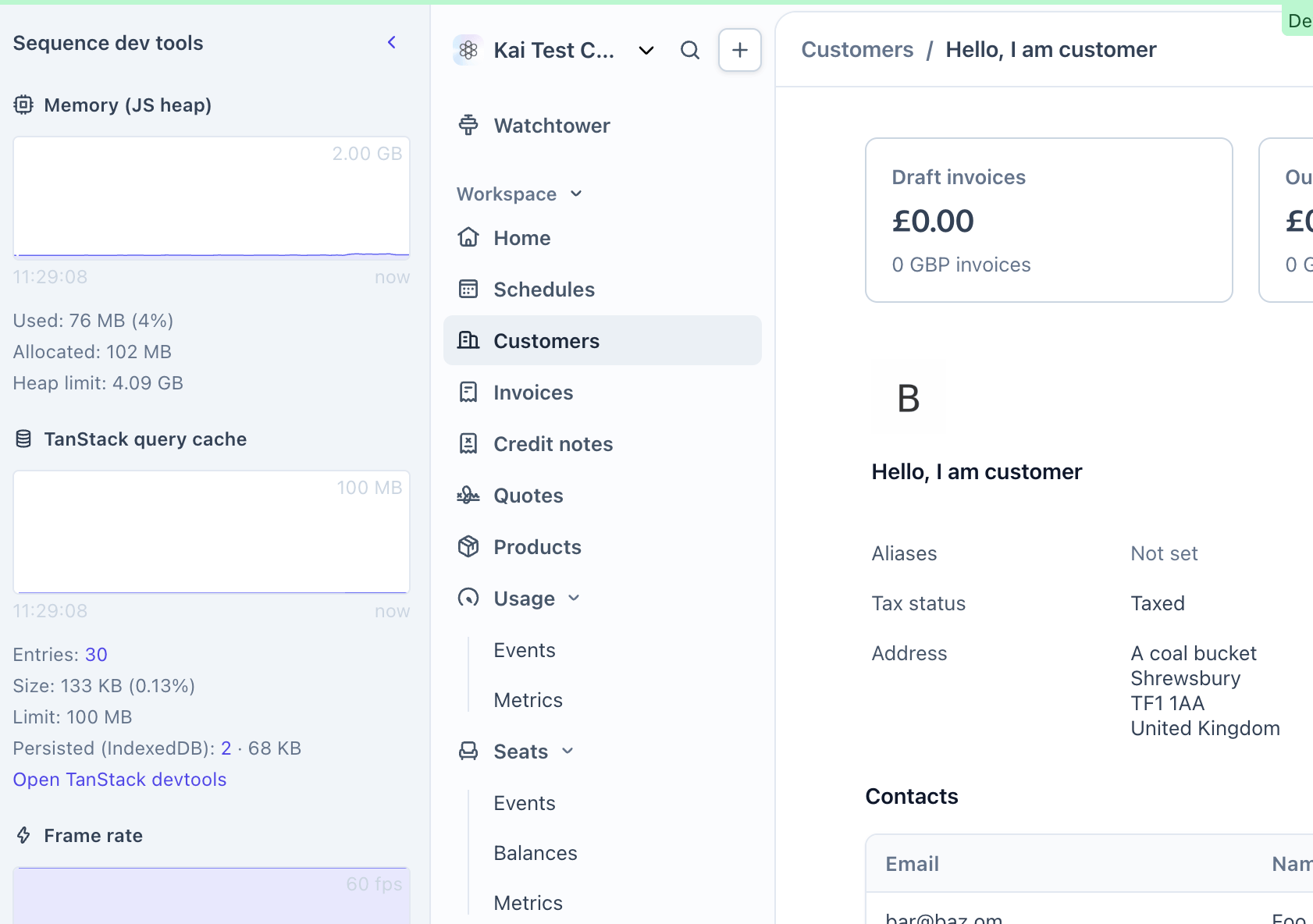
Which is awesome for keeping an eye on these things, and alerting you if you’ve accidentally done something that is blowing up the cache!
That’s all for now
There’s plenty more to explore around this topic, such as:
- How these foundations tie into our testing approach
- How we migrated to the Tanstack Query setup from an older solution, while retaining a backward compatibility layer
- More of a dive into exactly what our API package gives us, and how it tied into the aforementioned migration!
If you find this kind of stuff interesting, and would like to come join in on the fun, we’re currently hiring for more frontend-leaning Product Engineers!
References
[1] So the records say; you were stuck inside.
[2] At the time of writing, Tanstack Query has (roughly) as many weekly NPM downloads as the population of Argentina. Notable.
[3] Pour one out for the gas pipes out there with suspiciously drill bit shaped holes in them.
[4] Subject to the garbage collection configuration.
[5] A basic IndexedDB persister is given as an example in the Tanstack Query docs.